
Generic selectors
Exact matches only
Search in title
Search in content
Post Type Selectors

Framer Review: Is This AI-Powered Website Builder Worth Your Time?

Top alternatives:

Platform:

Desktop, Web Based, Browser Extension

Intergrations:

Social links:

Overview

Building a website can be a daunting task, especially for those without a background in coding or design.

Enter Framer, an AI-powered tool that promises to simplify the process, allowing anyone to create stunning, interactive websites in a matter of minutes.

But does it live up to the hype? Let’s delve into an in-depth review of Framer to find out.

Editor's review

Overall Score: 4.5

Framer is an innovative AI-powered tool that streamlines the process of web design and development. It is particularly notable for its ability to deploy websites rapidly, with built-in features that ensure sites are optimized for search engines and can scale efficiently through its content management system (CMS). Framer’s AI capabilities extend to localization, allowing for the generation of new pages with advanced localization features, and the dynamic rewriting of text to improve copy and resonate with different audiences.

PROS

  • Fast deployment of websites with search engine optimization
  • AI-powered localization for multilingual support
  • Intuitive AI website builder for users of all experience levels
  • Extensive library of pre-designed components for easy customization
  • Content Management System for efficient content handling

CONS

  • Generated images may often be in grayscale, which might not suit all projects
  • Some users may require more control over the design than AI-generated options provide
  • Advanced tasks may still require coding skills, despite the no-code tools

Framer Pricing

Pricing (monthly plan billed annually) Plan Best For
$0 Free For hobby sites
$5 Mini For simple sites
$15 Basic For personal sites
$30 Pro For larger sites
Custom Enterprise For enterprise sites

Framer site monthly pricing plans.
monthly pricing plan for Framer 1

Framer site annual pricing plans.
yearly pricing plan for Framer 2

Feature Mini Basic Pro Enterprise
Price (Per site per month) 5 USD 15 USD 30 USD Custom
Site Type Simple sites Personal sites Larger sites Enterprise sites
Pages Home and 404 150 pages Unlimited pages Custom limits
Visitors per Month 1,000 10,000 200,000 Custom limits
Custom Domain Yes Yes Yes Yes
Password Protection No Yes Yes Custom limits
CMS Collections No 1 collection 10 collections Custom limits
Page Search No 10 page search 300 page search Custom limits
Analytics + Cookies No No Yes Custom limits
Staging Environment No No Yes Custom limits
Enterprise Security No No No Yes
Custom Hosting No No No Yes
Uptime Guarantee No No No Yes
Dedicated Infrastructure No No No Yes
Launch Support No No No Yes
SSO for Sites No No No Yes

What is Framer

• Who is Framer for?

Framer is a versatile tool that caters to a wide range of users. Whether you’re a professional designer looking for an efficient design tool, a small business owner needing a website, or a budding entrepreneur with little design experience, Framer is designed to meet your needs.

• Framer Top features

Framer comes packed with top-notch features. Here are a few:

  • AI-Powered Tools: Framer uses AI to analyze your content and design preferences, then generates a website that suits your needs.
  • Easy Website Creation: With Framer, you can create a website in minutes without any coding or design skills.
  • Localization: Framer excels in catering to diverse languages and regions, offering a suite of features including localized text and images, adaptive designs.
  • Collaborative UI Design Tool: More than just a UI design software, Framer helps teams build better products. Collaborate with other designers, copywriters.

• Tips for using Framer

Here are some tips for making the most out of Framer:

  • 🌟 Explore the AI features: Framer’s AI capabilities are one of its standout features. Spend some time exploring these tools to see how they can enhance your website design process.
  • 🎯 Use the built-in templates: If you’re new to website design, start with Framer’s pre-made templates. These can provide a solid foundation for your website, which you can then customize to suit your needs.
  • 📺 Make use of the collaborative tools: Framer is designed to facilitate collaboration. Use these features to work effectively with your team and create a website that meets everyone’s needs.
  • ⏱️ Experiment with different designs: Don’t be afraid to experiment with different designs and layouts. Framer’s AI tools can generate a variety of options, so try out a few to see what works best for your website.
  • 🗣️ Take advantage of the localization features: If you’re creating a website for a global audience, make sure to use Framer’s localization features. These can help ensure that your website is accessible and appealing to users from different regions.
  • 📜 Keep your audience in mind: Always keep your target audience in mind when designing your website. Framer’s AI tools can help you create a site that resonates with your audience, but it’s up to you to provide the necessary input.

With these tips in mind, you can make the most of what Framer has to offer. Happy website building! 🎉

Product Hunt Review for Framer

What other users are saying about Framer

I have crosschecked my experience with the experience of other Framer users on Product Hunt.

Here’s what I found:

  • ⭐ Framer has a 4.7/5 rating on Product Hunt based on 447 reviews.
  • Most users praise Framer for:
    • 🎨 Creative and informative video content
    • 🚀 Fast AI-generated designs with accurate value communication
    • 💡 Early-stage development excitement with room for improvement
    • 💰 Affordability, simplicity, and quick launch capabilities
    • 🌐 Intuitive UI, smooth CMS features, and possibilities
  • 👍 Users appreciate Framer’s potential for accessibility but note:
    • 🔄 Formulaic templates and limited design freedom
    • 🎨 Bland color palettes and sometimes random generated images
    • 🚀 Expected future updates to enhance functionalities
  • 👎 Some users find Framer lacking compared to Webflow for complex sites:
    • 💻 Limited functionalities for advanced and complex websites
    • 🤖 Similar-looking Framer sites with rounded squares modules
    • 🔧 Webflow offers more freedom for tweaking and customizing code

How to use Framer

Framer’s user-friendly interface and AI-driven features make it an ideal tool for both new and experienced users. Here’s how you can utilize its features:

Starting with Framer

Begin by creating a free Framer account. Once you’re in Framer’s dashboard, you’ll spot a button that reads “Generate Page” in the “Quick Actions” menu. Click on it to enter the AI-powered prompt generator.
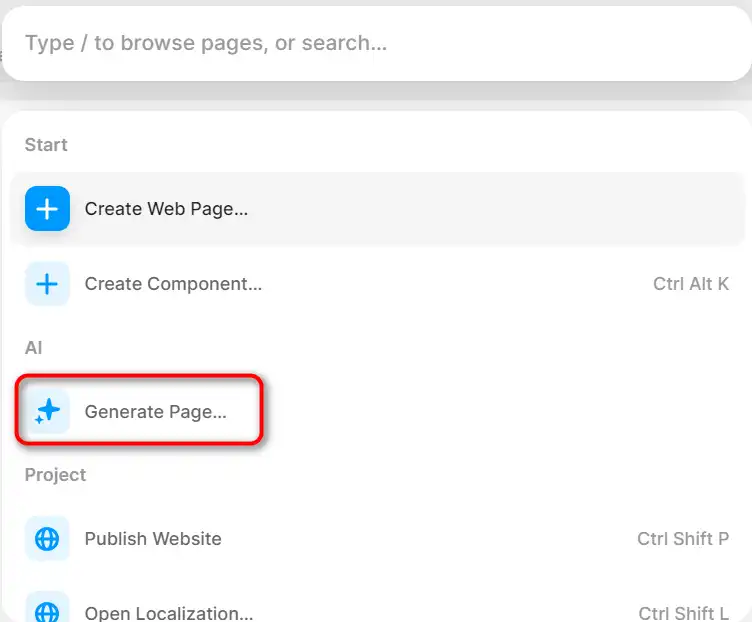
how to use Framer 3

Generating a Website

Provide a prompt for your website. Framer AI analyzes your input to understand the context and purpose of your site. It then generates a website that matches your description, choosing appropriate layouts, color schemes, and even creating relevant content based on your input.
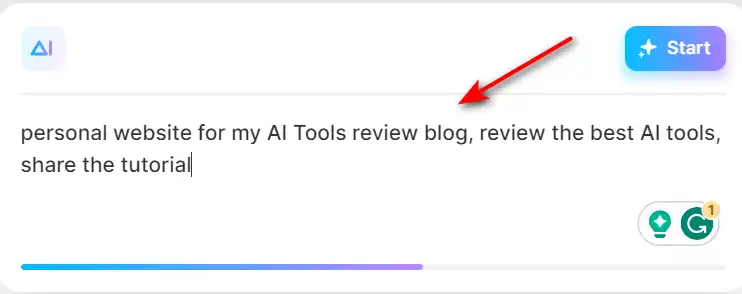
how to use Framer 4

Customizing the Website

Once the website is created, you can customize it to your liking. You can go to the right sidebar and make changes to the theme, add images, and animations. If you’re not entirely satisfied with the initial design, you can hit the “Regenerate” button to explore different visual directions until you find one you like.
how to use Framer 5

Deploying the Website

After customizing the theme, adding images, and animations, you can publish your website. The website is live and ready for use in just a few minutes.
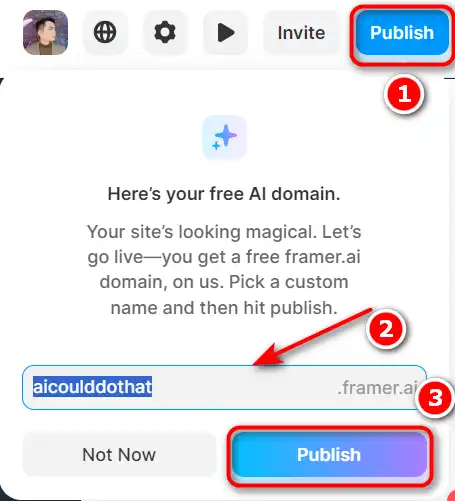
how to use Framer 6

Additional Features

Framer also offers a variety of additional features including HTML to Framer, Figma to Framer, infinite generated color palettes, handpicked typeface combinations, easy customization, AI-powered copy rewriting, and fast and efficient website generation.
how to use Framer 7

Framer Top alternatives

Hostinger Website Builder Review

Hostinger Website Builder is an AI-powered tool that helps you create a professional-looking website in minutes. You can choose from hundreds of templates, customize them with your own content, and publish your site with one click. Hostinger Website Builder is ideal for beginners who want to create a simple and attractive website without coding.

$2.49/mo

Framer FAQ

What is Framer? +

Framer is an AI-powered tool that enables users to generate and publish websites in seconds. It offers a suite of features that streamline the process of creating websites, including a built-in CMS, AI-powered localization, and site maintenance tools.

What does Framer’s AI feature do? +

Framer’s AI feature allows designers to quickly generate and customize landing pages, saving time and enabling easy creation of unique designs. It also includes a built-in copywriter to enhance website copy and allows users to mix and match display fonts, text fonts, and color palettes to build a theme for their site.

Does Framer require coding knowledge? +

No, Framer’s AI feature does not require coding knowledge as it is designed to be user-friendly.

Can I customize the websites generated by Framer? +

Yes, Framer allows users to customize the websites it generates to meet their specific needs.

What are the benefits of using Framer’s AI feature? +

The benefits of using Framer’s AI feature include saving time, enabling easy creation of unique designs, and streamlining the landing page creation process.

Is Framer suitable for non-technical users? +

Yes, Framer is a no-code tool, making it accessible for non-technical users.

How does Framer work? +

Framer uses AI technology to generate websites quickly by analyzing user preferences and eliminating the need for manual design work.

Can Framer replace designers? +

No, Framer AI is not a replacement for designers. It is a tool that assists in the design process by automating certain tasks, but the creativity and expertise of a designer are still crucial.

Framer Conclusion

Choose Framer for a seamless and efficient website design and deployment experience. It’s user-friendly, fast, and leverages the power of AI to create professional websites that meet your unique needs. With Framer, you can focus on your ideas and content while the AI does the heavy lifting of website design.

Featured AI Tools

Framer Related AI Tools

Replicate Review

Replicate

Hugging Face Review

The AI community building the future.

Uizard Review

App, Web, & UI Design Made Easy

Hostinger Website Builder Review

Let AI create you a website in minutes

RunPod Review

Rent Cloud GPUs from $0.2/hour